


AdTranquility VPN Spam Blocker
4.67.94K Reviews
App Specs
- Version
- 2.1.5
- Updated On
- License
- Free
- Downloads
- 1,000,000+
- Developer
- Leverage Technologies Social Media LLC
- Categories
- Tools
- Platform
- Android
Screenshots
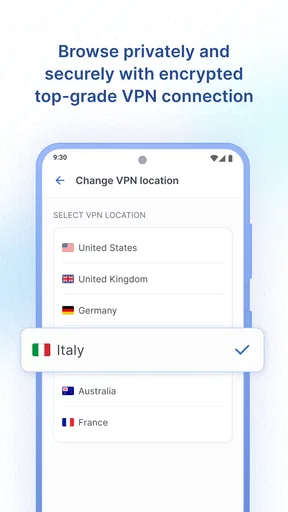
 Analysis by AppCompare
I judge a privacy tool less by grand promises than by the choices it makes visible. With an app meant to reduce spam and ad interruptions, I want to know what I can control, what information I may be asked to share, and whether I can tell what the app is doing. AdTranquility Spam Protection is a tools app from Leverage Technologies Social Media LLC, and its focus is easy to understand: make everyday phone use feel less disrupted. My cautious take is that it may suit someone looking for a straightforward layer of protection, but I would approach any privacy app by checking its prompts and settings rather than assuming its name tells the whole story.
Start with the choices you can see
When I try an app that touches messages or advertising, I pay attention to the setup screens before tapping through them. Permissions are meaningful decisions, not routine hurdles. I recommend reading each request in context and asking whether it matches the task you want the app to perform. If a permission does not make sense to you, pause and look for an explanation inside the app or in your device settings before proceeding.
That habit is useful here because spam protection can involve different kinds of phone activity, depending on how a particular tool works. I would not treat an installation as proof that every unwanted message will disappear, nor would I grant access casually just to get through setup quickly. Start with the least access you are comfortable giving, then see whether the app remains useful for your needs.
Privacy is a routine, not a one-time setting
Even a simple protection app deserves a second look after installation. I make a point of revisiting its settings after the first few days, once I have a better idea of what interruptions I want reduced. That helps me avoid leaving broad or inconvenient choices in place simply because I accepted them during setup. It is also a good moment to check the phone’s own permission controls and review whether the app still has access you want it to have.
For a shared or family device, I would explain what the app is intended to do before enabling it. That keeps a helpful filter from becoming a surprise change to someone else’s usual phone experience. The app is rated for Everyone, but I still think clear consent matters, especially when another person relies on the device for important messages.
First Impressions: Setting Up
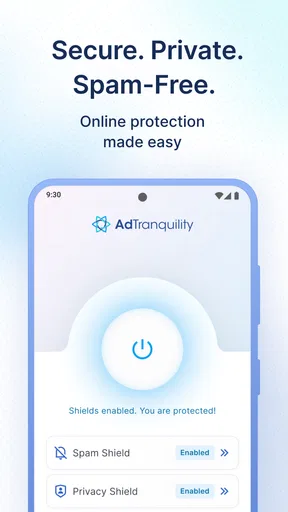
Getting started with AdTranquility Spam Protection was a breeze. The download and installation took mere minutes. Once I fired up the app, I was greeted with a straightforward, no-frills interface. It’s refreshing to see an app that doesn’t bombard you with a cluttered design. The setup wizard guided me through the initial configurations, and within no time, I was ready to roll.
One thing I appreciated right off the bat was the clear instructions. There’s a short tutorial that explains the main features, making it super easy to get the hang of it. You don’t need to be a tech guru to figure out how to use this app, which is always a plus in my book.
Worth Reading Before You Choose

EA SPORTS FC Mobile 26 Is a Bigger Football Game, but It Takes Time

Flipboard Shows What News Apps Must Do Beyond the Feed

Switching to Android Auto Means Rethinking Your Driving Routine

Google Calendar Makes a Crowded Week Easier to Manage

Ludo King Makes the Most of the Minutes Between Plans

Baby Panda World Brings Quick Play to Modern Phones, but Its Game Library Feels Busy
Diving into the Features
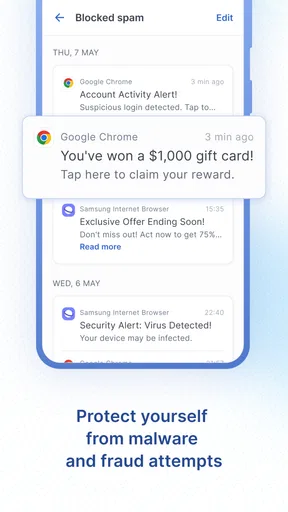
The main attraction here is, of course, the spam protection. The app boasts a powerful algorithm that filters out spam messages. I was a little skeptical at first, but after using it for a few days, I noticed a significant drop in junk messages. It felt like my phone had taken a deep breath of fresh air.
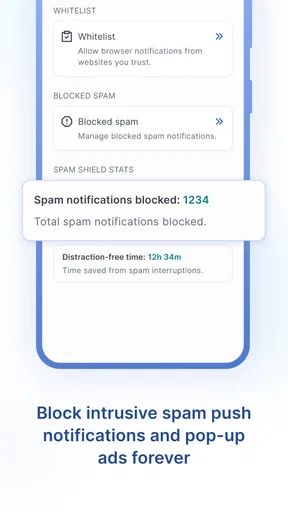
Besides spam blocking, the app also offers ad protection. This means fewer interruptions from those annoying pop-ups that seem to appear at the worst possible moments. It’s almost as if the app knows when you’re about to make a crucial move in your favorite game or send that important text.
Performance and Reliability
Now, let’s talk about performance. Does it slow down your phone? Not in my experience. The app runs quietly in the background, doing its thing without draining battery life or hogging resources. It’s like having a silent guardian watching over your phone.
In terms of reliability, I haven’t encountered any glitches or crashes, which speaks volumes about its stability. The developers seem to have done a solid job ensuring the app runs smoothly. Updates are regular, too, which means they’re actively working to improve the user experience.
User Experience: Smooth Sailing
Using AdTranquility Spam Protection feels seamless. The notifications are minimal, only alerting you when necessary. I appreciate that it doesn’t constantly ping you unless there’s something important.
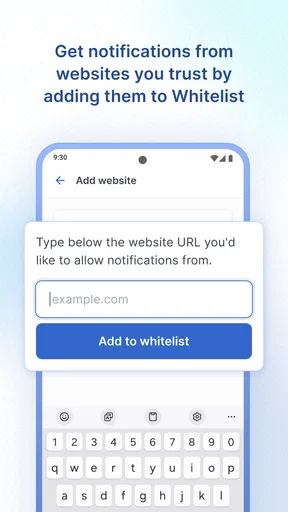
The customization options are a nice touch. You can tweak the settings to suit your preferences, like adjusting the spam filter sensitivity or selecting which types of ads to block. It gives you a sense of control over what gets through and what doesn’t.
Choosing the right protection for your routine
A useful way to assess a filter is to compare how it fits beside the protections you already use. Your phone’s built-in spam and notification controls may be enough if your main problem is a handful of nuisance alerts. A dedicated tool can make more sense when unwanted messages and ad interruptions are a recurring annoyance and you want those concerns grouped in one place. I would avoid running multiple filters with overlapping jobs until I understand how each behaves; layered tools can make it harder to work out why a message or alert was treated a certain way.
For example, if you receive a suspicious message while arranging a delivery, do not rely on a filter alone to decide whether it is safe. Check the sender through a trusted route, and avoid following unexpected requests for personal or payment details. A spam blocker can reduce clutter, but it cannot replace judgment when a message concerns an account, a purchase, or someone you know.
Make the settings work for real life
My practical tip is to begin with the default setup, then make one adjustment at a time. If you change several preferences together, it becomes difficult to tell which change helped or caused a problem. Keep an eye on legitimate messages you rely on—delivery updates, appointment reminders, or notes from a new contact—and check the app’s available controls if something important seems to be missing. This gradual approach is less frustrating than making the filter strict immediately and then trying to reverse a setting you cannot remember.
There is a trade-off between quiet and visibility. Stronger filtering can mean fewer distractions, while a more cautious setting may leave more unwanted material visible. I would choose convenience only up to the point where I can still find messages that matter. If a work or family conversation must never be missed, keep checking the relevant inbox or notification area until you are confident the setup suits that use.
Who will appreciate it—and who may not
I can see this app appealing to people who want a simple way to cut down on spam and ad interruptions without spending time learning a complicated interface. Its plain presentation and short tutorial make it approachable, especially if you are not interested in fine-tuning a long list of technical options. The app has a 4.6 average from around 48,000 ratings, and it has passed 500,000 installs, signs that many people have chosen to try it, though popularity alone cannot tell you whether its behavior suits your phone.
I would be more cautious if you need detailed explanations of every privacy practice before installing a tool, or if your phone’s built-in controls already handle the problem well. The app is free to download, with optional in-app purchases ranging from $0.99 to $119.99 per item, so I would review any purchase screen carefully and decide whether an upgrade is worth it to you before committing. It is also worth remembering that a filtering app is not a substitute for blocking a specific sender through your messaging service or reporting an abusive message through the appropriate channel.
What to check before relying on it
If you are wondering whether it is free, the basic app is free, while in-app purchases are available. If you are concerned about age suitability, its content rating is Everyone; for a child’s phone, I would still review permissions and settings together rather than treating the rating as a privacy guarantee. The current version is 2.1.3, and it was released on Oct 16, 2019. It requires at least OS 8.1, so check your device’s software compatibility before installing.
For privacy-minded users, the most useful question is not simply whether an app says it protects you, but whether you feel comfortable with the access it requests and the controls it gives you. I would read permission prompts carefully, revisit choices after setup, and use the phone’s own settings to review access when needed. Those steps do not require technical expertise, and they make it easier to decide whether the app belongs in your routine.
Final Thoughts: Is It Worth It?
So, is AdTranquility Spam Protection worth a spot on your phone? In my opinion, absolutely. If you’re tired of dealing with spam and intrusive ads, this app is a game-changer. It’s efficient, easy to use, and keeps your device running smoothly.
Overall, it’s a solid choice for anyone looking to tidy up their digital life. The peace of mind knowing that unwanted messages and ads are kept at bay is priceless. Give it a shot and see for yourself. You might just find it’s the spam protection you didn’t know you needed.
A measured recommendation
I would try it if spam and ad interruptions are a regular annoyance and I wanted an approachable tool rather than a complicated security suite. I would skip it if the phone’s existing controls already solve the problem, or if I was not comfortable with the access requested during setup. Leverage Technologies Social Media LLC’s app has a 4.6 average, but my recommendation rests more on matching its purpose to your routine than on ratings. Give the settings a deliberate check, keep an eye on important messages, and decide based on whether the quieter experience is worth the trade-offs for you.
Pros
- Easy to set up and use interface.
- Effectively blocks unwanted ads.
- Minimal impact on device performance.
- Regular updates for improved protection.
- Works offline for uninterrupted use.
Cons
- Limited customization options.
- Some ads might bypass protection.
- Premium features require payment.
- Occasional false positives detected.
- Not available on all devices.
FAQs for AdTranquility VPN Spam Blocker
What is AdTranquility Spam Protection and how does it work?
AdTranquility Spam Protection is an app designed to safeguard your device from intrusive spam messages and unwanted advertisements. It works by identifying and filtering out spam messages using advanced algorithms, ensuring that your inbox remains clutter-free. The app updates regularly to adapt to new spam techniques, providing continuous protection.
Is AdTranquility Spam Protection compatible with both Android and iOS devices?
Yes, AdTranquility Spam Protection is available for both Android and iOS platforms. The app is designed to integrate seamlessly with the operating systems, offering a user-friendly interface and efficient spam filtering. Ensure your device meets the minimum OS requirements for optimal performance.
Does AdTranquility Spam Protection require an internet connection to function?
While AdTranquility Spam Protection primarily functions offline by filtering messages stored on your device, it may require occasional internet access for updates. These updates are essential for maintaining the app’s effectiveness against new spam tactics and enhancing overall performance.
How does AdTranquility Spam Protection affect battery life and device performance?
AdTranquility Spam Protection is optimized to run efficiently without significantly impacting battery life or device performance. It operates quietly in the background, utilizing minimal resources. Users have reported negligible differences in battery consumption, ensuring your device remains fast and responsive.
Is my personal data safe with AdTranquility Spam Protection?
Yes, AdTranquility Spam Protection prioritizes user privacy and data security. The app does not store or share your personal information or message content. All filtering processes occur locally on your device, ensuring that your data remains confidential and protected from third-party access.


